Radiology Practice Staff Management

In brief: In a radiology practice, the schedule is driven by the equipment as much as by the staff. Each machine (X-ray, CT scanner, MRI, ultrasound) has its own slot schedule, and each technician has their own qualifications. Add on-call duty, urgent appointments and equipment maintenance, and you get a puzzle that an Excel spreadsheet cannot solve. Shyfter lets you structure your staff scheduling by machine and qualification, manage on-call duty and track hours with built-in time tracking.
The specific scheduling constraints of radiology
A radiology practice is not a standard medical practice. The schedule does not depend only on staff availability. It also depends on the machines, their slots and each technician's specific qualifications.
A schedule tied to the equipment
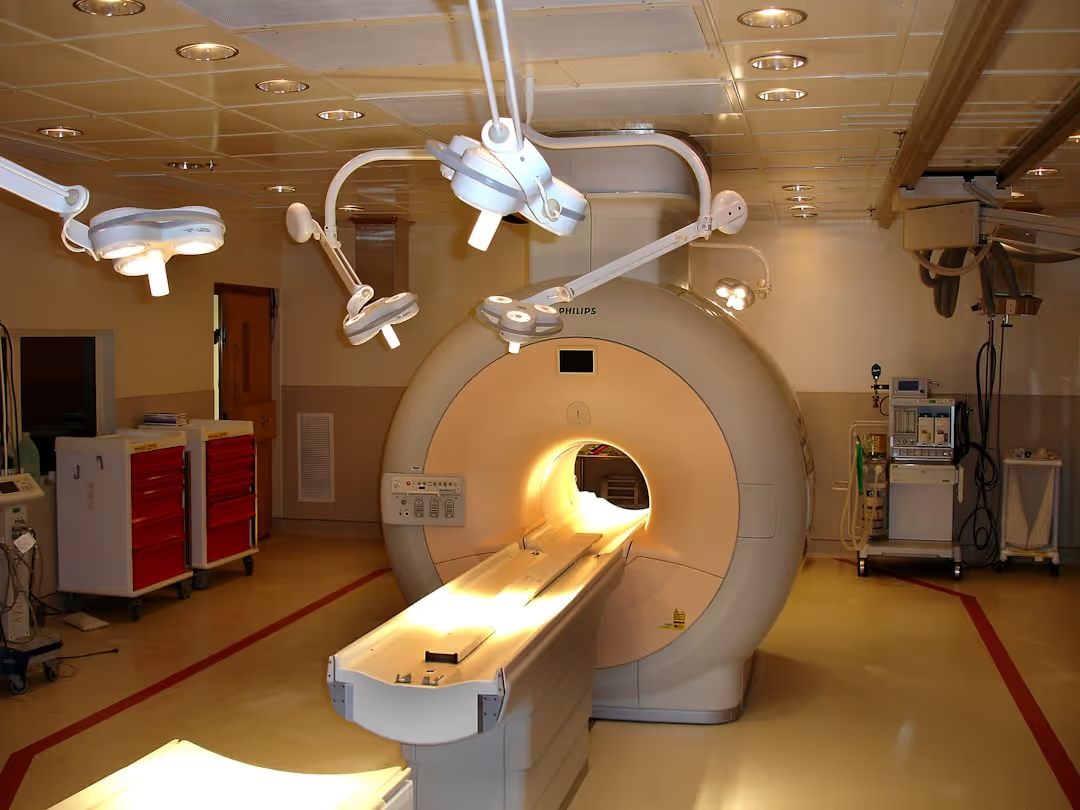
A CT scanner can only take one patient at a time. An MRI unit has a fixed slot schedule with durations that vary by type of examination: 15 minutes for a standard X-ray, 30 to 45 minutes for a CT scan, 45 to 90 minutes for an MRI. If the machine is busy, the technician waits. If the technician is absent, the machine stands idle. The two must be synchronised.
Qualifications per type of machine
Not every radiology technician is qualified for every machine. Operating a CT scanner or an MRI unit requires specific training and certification. A technician trained in standard radiography cannot operate a CT scanner without additional qualification. Your schedule must check this match at every assignment.
Strict appointment slots
Radiology examinations are by appointment, often prescribed by a doctor. Patients arrive on time and expect to be seen on time. A 20-minute delay on an MRI slot pushes back the rest of the day. Slots must be realistic and include patient preparation, the examination itself and the time to clean and reset the machine.
On-call duty and emergencies
Some radiology practices provide an emergency service, especially those attached to clinics. An emergency CT scan for a head injury cannot wait until Monday. On-call duty must be built into the overall schedule, with the related premiums and rest periods.
Equipment maintenance
Radiology equipment needs regular maintenance. A CT scanner under maintenance for 4 hours on Tuesday morning means a whole slot to reschedule. The staff schedule and the machine schedule must be synchronised to include these periods of unavailability.
Classic radiology scheduling mistakes
Scheduling an unqualified technician on a machine. You have a CT slot to cover and a technician available, but only qualified in standard radiography. The mistake is tempting when you are trying to fill a gap. It is unacceptable in terms of quality and safety.
Underestimating examination times. A lumbar MRI slot planned for 30 minutes when the real average is 45 minutes creates systematic delays. Patients wait, the team rushes and the quality of the examinations can suffer.
Forgetting maintenance slots. Unplanned maintenance forces same-day appointment cancellations. Patients must be contacted again and slots rescheduled. A schedule that includes maintenance in advance avoids this chaos.
Managing on-call duty separately from the regular schedule. A technician who worked a night on call and is scheduled for a normal shift the next morning: that is a problem of fatigue, of compliance and potentially of examination quality.
Organising the radiology schedule with Shyfter
Schedule by machine
Create one section per machine in Shyfter: standard radiography, CT scanner, MRI, ultrasound, mammography. Each section has its slots, examination times and staffing needs. You see at a glance which machine is covered, which is under maintenance and which is missing a technician.
Assign by qualification
Each technician has a profile with their qualifications: radiography, CT, MRI, ultrasound. When you fill a slot, Shyfter only suggests technicians qualified for that machine. No more assignment errors.
Build in preparation time
Set a buffer between examinations: patient setup, examination, cleaning, reset. Shyfter blocks these transition slots and prevents overbooking. Cascading delays disappear.
Schedule maintenance
Block the maintenance slots in the machine schedule. Shyfter automatically adjusts staffing needs: if the CT scanner is under maintenance on Tuesday morning, the CT technician is available for another workstation or released.
Manage on-call duty
Create an "on-call" shift type with its hours, premiums and rest rules. The technician on call appears in the overall schedule. Shyfter checks that rest after on-call duty is respected before scheduling the next shift.
Time tracking and hours
Time tracking suited to a radiology practice
Time tracking is done on a tablet or smartphone, quickly and discreetly. Each team member records their arrival and departure times in seconds.
Hours per type of examination
How many hours were spent on the CT scanner this week? What is the real utilisation rate of the MRI? This data helps you optimise the machine schedule and adjust staffing accordingly.
On-call duty and premiums
On-call hours (night, weekend) are automatically identified and paid at the premium rate under the applicable rules. The real cost of each on-call shift appears in your dashboard.
Payroll export
Regular hours, on-call duty, premiums, overtime: everything is exported to your payroll provider in one click. In Belgium, this includes social secretariats such as SD Worx, Securex, Acerta and Liantis, among more than 50 partners. See the integrations page for the full list.
Leave and absence management
In a radiology practice, the absence of a qualified technician can mean a machine standing idle for the day. If your only MRI technician is on leave, the MRI does not run. Leave management in Shyfter automatically checks the impact of each absence on equipment cover. Before approving leave, you know exactly which machines will be affected.
In Belgium, the Dimona declarations (employee registration with social security) for temporary replacements are generated automatically when the shift is confirmed.
Compliance and regulation in radiology
Radiation protection
Radiology is subject to strict regulations on protection against ionising radiation. Technicians must be authorised and follow continuous training in radiation protection. Your schedule must ensure that only authorised staff operate equipment that emits radiation. A technician whose authorisation has expired cannot operate a CT scanner.
Dose monitoring and staff rotation
Radiology technicians wear dosimeters that measure their cumulative radiation exposure. If a technician approaches the exposure limits, they must be temporarily reassigned to tasks without exposure (ultrasound, administration). The schedule must allow this rotation without compromising machine cover.
Working time and rest
General labour law applies: maximum working hours, daily rest between two shifts (at least 11 consecutive hours in the European Union) and weekly rest. In Belgium, for example, the standard working week averages 38 hours. On-call duty adds further constraints on compensatory rest. Shyfter checks these constraints automatically. See our regulatory compliance guide for the full framework.
Managing equipment profitability
The cost of an idle machine
A CT scanner or an MRI unit is an investment of several hundred thousand euros. Every hour the machine is available but unused (no qualified technician, no patient, unplanned maintenance) is lost revenue. The utilisation rate of each machine is a key indicator. Shyfter gives you the hours of cover per machine: you see which slots are underused and can adjust.
Optimise the machine and staff schedule
If your CT scanner is 95% busy in the morning and 60% in the afternoon, the problem is not the machine, it is the spread of appointments. Steer patients towards quieter slots. On the staff side, a multi-skilled technician (X-ray and CT) offers more flexibility than a single specialist. Investing in cross-training improves machine utilisation and reduces dependence on a single person.
What Shyfter changes for your practice
Before: a paper schedule per machine, an Excel sheet per technician, on-call duty noted in a separate diary and a manual payroll export.
With Shyfter: a single schedule by machine and by technician, qualifications checked automatically, maintenance built in, on-call duty in the same schedule and a one-click payroll export.
Other healthcare professionals use Shyfter: discover the solutions for dental practices, clinics and laboratories.
FAQ
How do I synchronise the staff schedule and the machine schedule?
Create one section per machine in Shyfter and assign qualified technicians to each section. The schedule shows machine cover and staff availability at the same time. If a machine is under maintenance or the qualified technician is absent, you see it immediately in the same view.
How do I run a practice with multi-skilled technicians and specialists?
Enter each technician's qualifications: radiography, CT, MRI, ultrasound. Multi-skilled technicians appear as available on several machines, specialists only on their own machine or machines. When needed, you can reassign a multi-skilled technician to fill a gap on a specific machine.
How do I fit emergency slots into an already busy schedule?
Reserve 1 or 2 slots a day on the machines most used for emergencies (mainly the CT scanner). These slots appear as "reserved for emergencies" and are not offered for standard appointments. If they are not used by the end of the morning, release them for scheduled examinations.